

In construction and contracting, trust is built the same way you build a solid foundation: with care and good work. Your website is often the first thing a potential client sees.
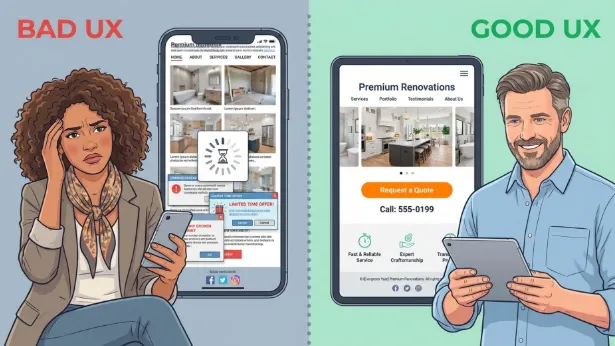
So what is UX-focused website design for contractors and builders? It means building a website experience that puts the visitor first. The site should be easy to use, quick to load, and simple to understand. It should also guide people step by step until they feel ready to call you or send a quote request.
A contractor website is no longer just an online flyer. Today, it works like a sales tool, a proof-of-quality tool, and a key part of how clients decide who to hire.
A busy homeowner or a commercial client is not just searching for “a contractor.” They want a clear answer to their problem, plus a feeling that they can rely on you. UX design helps your website deliver that, so the whole experience feels smooth, positive, and easy from the first click to the first contact. You can learn more about it on https://builtfor.studio/services/website-design-and-development/.
What Is UX-Focused Website Design for Contractors and Builders?
UX (User Experience) for contractor and builder websites is a full approach to how people use your site. It includes how the site looks, how information is organized, how fast it runs, and how easy it is to find important things like your phone number-especially on a mobile phone. For a contractor, good UX means visitors can quickly view your work, understand your services, read reviews, and feel confident enough to contact you.
It also means designing with the client in mind. A homeowner planning a kitchen remodel may worry about cost, mess, and delays. A commercial developer may care more about timelines, process, and proof that you can handle large jobs. A UX-focused site plans for these different needs and gives people clear paths to the answers they want, so using the site feels as smooth as the finished project you deliver.
How Does User Experience Differ from Traditional Website Design?
Traditional website design often put most of the focus on looks and on sharing information from the business side. It worked like a digital signboard: “This is who we are and what we do.” Design style still matters, but older-style sites often missed how real people move through a website and what helps them decide to take action. The goal was to show information, not to guide the visitor through it in a helpful way.
User Experience design changes the focus from “how it looks” to “how it works for the person using it.” It often includes learning how users behave, testing what confuses them, and improving the layout over time. For a contractor, this means shifting from a site that just lists services to one that answers questions, reduces doubts, and builds trust through its structure. It’s like the difference between a house that looks nice and a home that feels easy to live in every day.
Why Is UX Important for Contractor and Builder Websites?
Construction is competitive, so a strong UX can help you stand out. Many clients start online, and their first opinion of your company is shaped by your website. If the site is slow, confusing, or hard to use, they may leave fast and choose a competitor-even if your work is better. You can be the best builder in town, but a weak website can hide that.
Also, contracting projects often cost a lot and take time, so people need reassurance. A website with strong UX shows professionalism and reliability before you ever meet. It shows you respect their time and understand what they need. A good UX is like a firm, confident handshake-building early trust before any work begins.
What Are the Benefits of UX-Focused Website Design for Contractors and Builders?
Choosing UX-focused design for your contractor or builder website brings real benefits that affect your leads, your reputation, and your growth. It turns your site from something that just “exists” into something that actively brings in work. The value goes beyond looks and can improve how people find you, how long they stay, and how often they contact you.
These benefits work together. When people have a better experience, they engage more. When they engage more, search engines notice. And when visitors trust what they see, they reach out more often. Good UX supports your whole online setup so that each click and scroll moves people closer to hiring you.
Improves SEO Ranking and Online Visibility
Search engines like Google now reward websites that are easy to use. If your site loads quickly, works well on phones, is easy to move through, and keeps people reading, these are strong signals that your site is useful. This can help your rankings when people search for “contractors near me” or “home builder in [city].”
Good UX can lower bounce rate (people leaving right away) and increase time on site, which can support better rankings. When you build a UX-focused website, you help real visitors and also meet the standards search engines look for. That makes UX a core part of modern online marketing for contractors.
Increases Conversion Rates and Lead Generation
The main job of a contractor website is to turn visitors into leads. UX-focused design makes that easier by removing obstacles. Clear calls to action (CTAs), simple contact forms, visible phone numbers, and well-organized service pages all work together to guide people toward asking for a quote or booking a consultation.
When a website feels simple and pleasant to use, visitors trust the business more. That trust often leads to more form fills and more calls. Instead of searching around or giving up, people see a clear next step and take it. This is what good UX does: it matches how users act and makes contacting you feel easy.
Builds Trust and Credibility with Potential Clients
For big projects like remodeling or building, trust matters most. A modern, clean, easy website shows that you are skilled and dependable. It suggests you pay attention to details and follow good standards. On the other hand, an old or hard-to-use website can make people doubt your professionalism.
UX design supports trust by showing your work clearly, explaining services in plain language, and sharing real testimonials. It also lets you explain who you are and what you stand for before you even speak to a client. Since referrals and reputation matter so much in construction, a trustworthy website can help you attract better leads and grow faster.
What Key UX Factors Influence Contractor and Builder Website Success?
A successful contractor website doesn’t happen by chance. It comes from getting several UX factors right. Each part affects how visitors feel, what they understand, and whether they stay long enough to contact you. Improving these items helps turn your website into a tool that supports your business goals.
From the first second someone lands on your site until they decide to call or leave, every detail plays a role. If one piece causes friction, people may get frustrated and click away. Below are the main parts that shape strong UX for contractor and builder websites.
Navigation Clarity for Busy Users
Your clients are often busy-homeowners balancing family and work, or business owners managing many tasks. They don’t want to fight with confusing menus or hunt for basic info. Navigation should be simple, clear, and consistent. You need a clear main menu, services grouped in a logical way, and an obvious “Contact” option.
Think about what people usually look for first:
- Your past work (photos and projects)
- Your services and service area
- Reviews and testimonials
- How to get a quote or call you
If your menu matches these common paths, visitors find answers faster and stay engaged.
Website Speed and Performance
People expect websites to load fast. If your pages take too long, many visitors will leave before seeing your work. Contractor sites often use large images and videos, which can slow everything down if they are not set up correctly.
Speed also affects search rankings. Google favors faster sites, so slow speed can hurt visibility and user satisfaction at the same time. Steps that help include better hosting, smaller image sizes, browser caching, and removing extra code so the site stays fast and smooth.
Mobile Responsiveness and Accessibility
A large amount of traffic comes from phones. Many clients will check your site while on a break or while waiting somewhere. If your website does not adjust properly to mobile screens, it will feel broken. Text must be readable, buttons easy to tap, and layouts easy to follow on any device.
Accessibility also matters. This means people with disabilities can use your website too. Common accessibility needs include:
- Alt text for images
- Good color contrast
- Keyboard-friendly navigation
- Clear headings and page structure
An accessible site can also support legal compliance and shows you care about serving everyone.
Visual Hierarchy and Content Structure
People scan pages quickly. Visual hierarchy means setting up the page so the most important information stands out first. This is done with spacing, text size, contrast, and clear headings, so the visitor’s eyes naturally move through the page in the right order.
Content structure supports this. Long blocks of text are hard to read online. Short paragraphs, bullet lists, and clear subheadings make your content easy to skim. For contractor websites, this helps visitors quickly understand your services, your process, and what makes you a good choice.
Branding and Consistent Messaging
Your website should feel like a clear extension of your company. Consistent branding-logo, colors, photos, and writing style-makes you easier to remember and helps you look professional. If every page feels different, visitors may feel unsure about who you are.
Your message should also stay consistent. Your site should clearly answer:
- Who you help
- What you do
- What makes you different
When people see the same clear message across your pages, it builds trust and makes your offer easier to understand.
Effective Use of Portfolio and Visuals
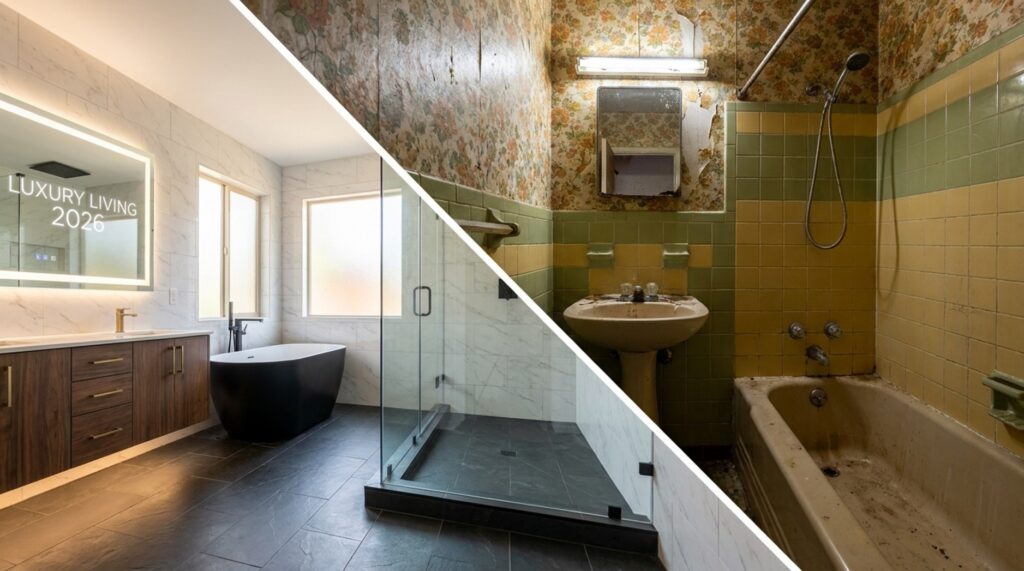
For contractors and builders, photos sell your work. A strong portfolio is one of the most important parts of your site. Use professional images that show your quality and details. Showing “before and after” photos can make your results even more clear.
Organize your portfolio in a way that makes sense, such as by project type (kitchens, bathrooms, new builds, commercial work). Each project page should include a short summary that explains the problem, what you did, and what the client gained. Video tours and drone shots can also help, as long as they don’t slow the site down.
Incorporation of Social Proof and Testimonials
Reputation drives construction work. Testimonials, reviews, and ratings help visitors trust you faster. People often trust past customers more than marketing text. Place reviews on key pages like your homepage and service pages, and also keep a dedicated reviews section.
To make social proof stronger, you can include:
- Customer photos (with permission)
- Short video testimonials
- Links to third-party reviews (Google, Houzz, Yelp)
- Awards, licenses, and certifications
This proof helps visitors feel safer choosing you.
Clear Calls to Action and Contact Options
Visitors should never wonder what to do next. Your CTAs should be clear and easy to spot, like “Request a Quote” or “Schedule a Consultation.” Place them where people naturally look: near the top of pages, after service descriptions, and near portfolio sections.
Contact options should also be simple. Your phone number should be visible across the site and clickable on phones. Your contact form should be short, with only the fields you really need. Giving multiple contact methods (call, form, email) helps match different preferences and increases leads.
What Are the Best Design Practices for Contractor and Builder Websites?
Once you have the main UX pieces in place, certain design choices can make your site feel more modern, clear, and memorable. These practices improve usability and also help your brand stand out in a crowded market.
Good design is not just “pretty.” It supports clear communication and smooth performance, and it should match the quality of the work you do on job sites.
Minimalist and Professional Design Styles
For contractors and builders, a clean and professional look often works best. Minimal design keeps pages focused so your project photos and key info stand out. This usually means plenty of open space, a small color palette, and easy-to-read fonts.
Professional design also avoids outdated effects and messy layouts. A simple, modern style can help visitors trust you quickly and see you as reliable and current.
Custom Photography and Project Showcases
Stock photos can make your business feel generic. Real photos of your team and your projects build trust much faster. High-quality custom photography shows what you actually do and helps clients picture their own project.
Project showcases work best when they tell a story, not just show images. For each project, include the scope, the challenge, the solution, and the outcome. You can also add materials, timelines, or a short quote from the client. This turns a simple gallery into a strong sales tool.
Background and Featured Videos without Sacrificing Speed
Video can quickly show the quality of your work and your process. A short background video or a featured project video can make a strong first impression. Team videos and client videos can also build trust fast.
But videos must be set up carefully. Large files can slow the site and push visitors away. Use compressed files, modern formats like WebM, and lazy loading so videos add value without slowing the page.
Subtle Micro-Animations to Improve Interactivity
Micro-animations are small movements that give feedback, like a button changing color when you hover or a section fading in as you scroll. These details can make a site feel smoother and more modern.
Used lightly, micro-animations help users understand what is clickable and what changed after an action. For contractor sites, this might be a smooth reveal in a portfolio grid or a simple effect on service icons. The goal is polish without distraction or slowdown.
Strategic Use of Colorful Gradients and Brand Colors
Minimal design can still include color in smart ways. Gradients (smooth color blends) can add depth and a modern feel when used in small areas like headers, section backgrounds, or CTA buttons.
Most importantly, use your brand colors the same way across the site. Colors should help highlight important items, guide attention, and make the site feel consistent. A clear color system makes your brand easier to recognize and remember.
Practical Tips to Boost Your Contractor Website’s User Experience
Strong UX basics are important, but practical steps can push your site further. These tips focus on content, visuals, and communication, so your site feels human, clear, and easy to act on.
When you support the client’s journey and emotions, your website can turn casual visitors into real leads. These ideas help show your skills in a way that feels honest and easy to trust.
Make Prospective Clients Central to Your Website Story
Don’t make your website only about your company. Write for the client. Talk about their goals and problems, and show how you help. Use simple, direct language like “Want a new kitchen that fits your family?” or “We help you plan, build, and finish with less stress.”
This makes your content more relatable. Instead of listing services, explain the results clients get. This builds connection and makes you feel like a partner, not just a vendor.
Leverage Emotional Copy and Inspiring Project Imagery
Construction work is often personal. People may be building a dream home, fixing storm damage, or updating a business space. Your writing should reflect that and match it with strong images that show finished results.
Try describing the outcome, not just the space. A remodel can mean easier mornings, better family time, or a more productive workspace. When strong photos and clear, emotional writing work together, your services feel more real and easier to imagine.
Feature Before-and-After Photos for Social Proof
Before-and-after photos show your impact in seconds. They help visitors trust that you can handle their project and deliver real change.
Create an easy-to-find before-and-after section. For each set, add a short note explaining the issue and how you solved it. This shows both the end result and your problem-solving skills.
Use Video to Introduce Your Team and Business Approach
Construction is built on relationships. Video helps people feel like they know you before they call. A short video that introduces your team, explains your process, or shows how you work can build trust quickly.
Ideas include a “Meet the Team” clip, a behind-the-scenes project video, or a short message from the owner. It doesn’t need to be perfect-clear sound, honest messaging, and simple visuals are what matter most.
Encourage Direct Contact with Prominent Lead Forms and Phone Numbers
If you want leads, make contact easy. Your phone number should be visible on every page and clickable on mobile. Don’t hide it on a contact page only.
Forms should be short and simple. Ask only for what you need to respond. You can also add:
- A “Request a Quote” page
- Service-specific forms (remodel, roofing, new build)
- A sticky “Contact” button on mobile
These options reduce friction and can raise your conversion rate.
Which Tools and Techniques Improve User Experience on Contractor Websites?
Improving UX is ongoing. The best contractor websites keep testing and improving. The right tools help you see what users do, find technical issues, and keep your website competitive as online expectations change over time.
Your platform, tracking, and site checks all support a smoother experience and better results. Investing in these tools shows you take your online presence seriously, just like the work you do in the field.
Content Management Systems Optimized for UX
A strong website starts with a solid Content Management System (CMS). For contractors, common choices include WordPress (with good themes and plugins), Webflow, and other industry-focused platforms. The CMS should support mobile-friendly design, quick updates, and easy integration with other tools.
A good CMS makes it easier to add new projects, update testimonials, and keep your content current without needing a developer for every small change.
User Testing and Conversion Tracking
If you don’t measure, you can’t improve. User testing shows where people get confused or stuck. Tools like Hotjar and Crazy Egg can show heatmaps, scroll behavior, and session recordings so you can see how visitors actually use your site.
Conversion tracking tools like Google Analytics and Google Tag Manager show what people do before they contact you. By tracking key actions (form submits, phone clicks), you can find weak spots and improve them.
SEO Tools for Technical and On-Page Optimization
Even the best website won’t help if nobody finds it. SEO tools help you fix technical issues, find useful keywords, and monitor search performance. Common tools include Google Search Console, SEMrush, Ahrefs, and Moz.
These tools also help you improve on-page details like headings, meta descriptions, internal links, and image alt text. Good SEO supports your UX work by bringing the right people to your site.
Accessibility Audit Tools
Accessibility checks help make sure everyone can use your website. They also support legal compliance in many places. Tools like Google Lighthouse and Axe DevTools can scan for common issues like low contrast, missing alt text, and keyboard navigation problems.
Running audits regularly and fixing what they find helps create a more inclusive site and can improve your reputation as a thoughtful, responsible business.
Real-World Examples: UX-Focused Contractor and Builder Websites
It helps to see what UX looks like in practice. Picture websites that combine strong project visuals with simple menus and clear next steps. The examples below show how different contractor types can use UX to attract and convert the right clients.
They also show that UX works best when it fits the type of customer you serve, whether that’s homeowners in a hurry or commercial teams that need fast answers.
Case Study: Roofers and Remodelers
Consider “Summit Roofing & Renovations.” Their website focuses on fast problem solving. The homepage includes a clear “Emergency Repair” button and a simple list of services (roof repair, replacement, kitchen remodels, bathroom renovations). Before-and-after sliders show changes clearly, especially for storm damage and older interiors. The main menu stays simple: “Services,” “Portfolio,” “Testimonials,” “About Us,” with a bright “Get a Free Estimate” button always visible.
The site loads very quickly on mobile, since many users may be searching during stressful moments. Each service page has a short lead form and a visible phone number. Testimonials include star ratings and photos to build trust fast. Their blog shares practical maintenance tips and renovation ideas, which helps SEO and positions them as a helpful expert. The UX is built to answer questions quickly and make contacting them feel like the obvious next step.
Case Study: Home Builders and Architects
“Artisan Homes & Design” shows a UX approach for custom home builders. Their homepage uses strong visual storytelling, with a full-width video that includes drone footage and short client clips. Their portfolio is the main focus, organized by style and location. Each project page includes professional photos, virtual 3D tours, floor plans, and a story of the client’s idea and how Artisan built it.
The menu guides visitors through “Our Process,” “Portfolio,” “Design Philosophy,” and “Contact Our Team.” A style quiz helps visitors figure out what they like, making the experience feel more personal. Testimonials are shared as short story videos, not just text quotes. They also offer a downloadable “Custom Home Building Guide” in exchange for an email to capture leads. The UX fits a high-end audience that expects detail, smooth design, and a clear path from inspiration to consultation.
Case Study: Subcontractors and Special Trades
“Precision Plumbing Solutions,” a commercial plumbing subcontractor, targets general contractors and project managers. Their website focuses on clarity and speed. The homepage highlights key services (industrial piping, commercial HVAC plumbing, emergency calls) with icons and short descriptions. A “Certifications & Safety” page is easy to find, showing licenses, insurance, and safety records-important for B2B trust.
The portfolio is organized by project type and size, with testimonials from general contractors that focus on reliability and teamwork. A “Request a Bid” form is simple and asks only for the essentials to keep the process quick. A “Meet Our Team” page adds headshots and short bios to make the company feel more human. Their blog covers new plumbing tech and code updates, which supports credibility. The UX fits the fast needs of commercial jobs: quick info, strong proof, and an easy way to request pricing.
What Are Common Questions about UX and Website Design for Contractors?
When contractors and builders start learning about UX-focused website design, they often ask similar questions. Most of these are about how to get started, what it costs, and how to measure results.
Clear answers help take the mystery out of the process and help business owners make smart choices so their website becomes a real asset, not just an online placeholder.
Should You Use a Template or Invest in Custom Design?
Templates are cheaper and faster. They give you a ready-made layout you can fill with your content and branding. They can work well for new businesses or smaller budgets. But templates can limit how unique your site looks and how well it fits your exact needs. You may also end up with extra features you don’t use, or you may miss features you want.
Custom design costs more and usually takes longer, but it gives you full control. A custom site is built around your brand, your services, and how your clients choose a contractor. This often leads to a more unique site and a stronger UX. It also gives more room to grow and add features later. The right choice depends on your budget, timeline, and how much you need to stand out.
How Much Does a UX-Focused Contractor Website Cost?
Pricing can vary a lot, just like construction pricing. The final cost depends on the design depth, how many pages you need, extra features (like calculators or booking tools), content quality (photos and video), and whether you use a template or a custom build.
A solid template-based site may cost a few thousand dollars. A larger, custom-built site with a big portfolio, strong UX work, and custom features can cost tens of thousands of dollars or more. The real goal is value: what you get for the cost, and how well the site helps you win work over time. Get clear quotes and make sure you understand what’s included.
How Does Website Speed Affect User Experience and SEO?
Speed has a direct effect on UX and SEO. For UX, slow pages frustrate users, and many will leave within seconds. For contractors, that can mean losing leads before a visitor even sees your work.
For SEO, Google uses speed as a ranking factor. Faster sites can rank better because search engines want to send users to pages that load quickly. Improving speed with clean code, compressed images, good hosting, and caching helps both rankings and user satisfaction at the same time.
Key Takeaways for UX-Focused Website Design for Contractors and Builders
Online expectations keep changing, and UX-focused website design for contractors and builders is now a core part of getting more business. It’s not just a design trend. It’s a shift in how strong companies connect with clients online. Building a better website is ongoing work, and it requires regular updates and a clear understanding of what your clients need.
Looking ahead, artificial intelligence and more personal website experiences will play a bigger role. A contractor website may show different projects based on what a visitor looks at, or guide people faster using voice search. Tools like augmented reality (AR) could also help clients see how a renovation might look in their own home using their phone. The future of UX for contractors is about using these new tools to make websites easier, more engaging, and more personal-so clients feel confident choosing you.
